Access denied on GoldenGate Manager

After apply GoldenGate fix 12.1.2.1.10 on GoldenGate for Oracle Databases 11G getting error below during GoldenGate Director Server access:

ggserr.log: WARNING OGG-00936 Oracle GoldenGate Manager for Oracle, mgr.prm: Access denied (request from 10.1.1.10, rule #4).
To allow a remote Director server connection, you must add in the ./GLOBALS:
_DISABLEFIX21427144
_DISABLE21427144

Maiquel.

<EJB Exception in method: ejbPostCreate: java.sql.SQLException: XA error: XAResource.XAER_RMFAIL start() failed on resource 'ggds-datasource_domain': XAER_RMFAIL : Resource manager is unavailable

Some incidents that we face are expected. Usually we wait for problems when something changes in an environment.
But, some times, for no apparent reason, with no systemic alteration, we encounter errors where our first reaction is: what a f ***!?

This time we find a java exception in a standard domain for GoldenGate Director;

For months the application behaved stable and functional, until it did fails for no apparent reason;

When I saw part of the exception, “XAER_RMFAIL: Resource manager is unavailable” went straight to talk to one of the best DBAs know that Matheus Boesing, to request a check on the resource manager database, (No problem found).

… then we fall back into a BUG: 11672297 Bug: ORA-01092 MAPPED TO XAER_RMERR instead of XAER_RMFAIL – (Doc ID 1329800.1)

In version 12.1, this bug is fixed, but as a palliative solution can do the following:

Increase the value (Maximum Duration of XA Calls) in JTA configurations of weblogic domain, the default value is 12000, in my case, I adjusted to 48000;

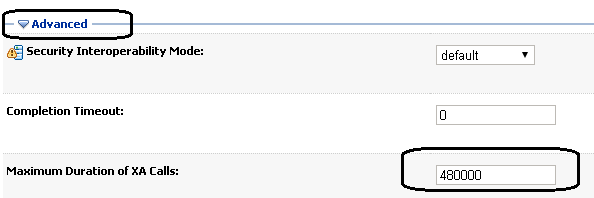
The problem was solved, at least for now.
Dieison.
 

OGG-0352: Invalid character for character set UTF-8 was found while performing character validation of source column

Almost a month without post!
My bad, december is always a crazy time to DBAs, right?

This post’s title error happens because the charset is different between databases used on replication thought GoldenGate and occurs only with alphanumerical columns (CHAR, VARCHAR, VARCHAR2), because, even the char length be the same, the data length will be different (like I explained here). Take a look in this example:

sourcedb> select table_name,column_name,data_length,char_length from dba_tab_cols where column_name=’NAME' order by 1,2,3;
 
TABLE_NAME    COLUMN_NAME     DATA_LENGTH CHAR_LENGTH
------------- --------------- ----------- -----------
TABLE_EXAMPLE NAME            25          25
destdb> select table_name,column_name,data_length,char_length from dba_tab_cols where column_name=’NAME' order by 1,2,3;

TABLE_NAME  COLUMN_NAME     DATA_LENGTH CHAR_LENGTH
------------- --------------- ----------- -----------
TABLE_EXAMPLE NAME            100         25


There is basically two solutions:
1) Change one of those charsets.
2) Add “SOURCECHARSET PASSTHRU” clause on the replicat file.

I usually prefer the second option, just because it’s less intrusive than number 1.


See ya!
Matheus.

OGG-01934 Datastore repair failed, OGG-01931Datastore ‘dirbdb’ cannot be opened

After change GoldenGate 12c to ACFS filesystem, got eternal WARNING OGG-01931, even Datastore is created:
WARNING OGG-01931 Oracle GoldenGate Manager for Oracle, mgr.prm: Datastore ‘dirbdb’ cannot be opened. Error 2 (No such file or directory).

Complete solution steps to resolve the issue on SHARED FILESYSTEM:
1. Login to ggsci prompt and stop all OGG processes including jagent and manager
2. Run “delete datastore” command. Confirm delete of datastore
3. Run “CREATE DATASTORE SHM” command
4. Start all OGG processes; start manager, start *, start jagent

ON GGSCI CREATE DATASTORE SHM [ID n]
Indicates that the data store should use System V shared memory for interprocess communications.

Maiquel.

GoldenGate: RAC One Node Archivelog Missing

The situation:

We have a GoldenGate on Allow Mode running some extracts on RAC One Node Database (reading the archivelogs). And then, suddenly, the instance crashes (network lost contact to the server) and the other instance (thread) was auto started by CRS. To the database no problems: The other node redologs was used during the startup recover and every thing is ok.

The application running with Weblogic serverpool and gridlink just had a little contention and continued the operation thought the started instance. The Goldengate switch was manually made, but some sequences was lost. What we found? the sequences was in the old thread’s redologfiles. It should be backed up if fast_start_mttr_target was different to zero. Buuut, the world is not so beautiful:

raconenodedb> show parameters mttr
NAME TYPE VALUE
------------------------------------
fast_start_mttr_target integer 0

How we solved?
Simple solution: identified the group/thread and made a cp from ASM. The copied redolog was used as archivelog on goldengate and everything was ok.

raconenodedb> select sequence#,group#,thread# from v$log where thread#=2 order by 1;
SEQUENCE# GROUP# THREAD#
---------- ---------- ----------
39636 6 2
39637 7 2
39638 8 2
39639 9 2
39640 10 2
ASMCMD> cp group_10.288.859482805 /oracle/grup10_thread2
copying +DGDATA/MYDB/ONLINELOG/group_10.288.859482805 -> /oracle/grup10_thread2

Easy like that.

Matheus.