GoldenGate – exclude Oracle database thread#

Your Oracle database instance status changed , so you need to dismiss some thread# on GoldenGate.

SQL> select INST_ID,thread#,status from gv$thread;

INST_ID THREAD# STATUS
———- ———- ——
1                   1                OPEN
1                   2               CLOSED

Try to insert ‘THREADOPTIONS PROCESSTHREADS EXCEPT X’ on your GoldenGate PRM file.
Where X means thread# instance want to ‘exclude’.

It may cause data loss.

Maiquel.

Error BAD_CERTIFICATE in Node Manager

Error:

Mar 8, 2016 2:41:16 PM weblogic.nodemanager.server.Handler run
WARNING: Uncaught exception in server handlerjavax.net.ssl.SSLKeyException: [Security:090482]BAD_CERTIFICATE alert was received from app1osbxpto1.localhost.net - 192.28.140.25. Check the peer to determine why it rejected the certificate chain (trusted CA configuration, hostname verification). SSL debug tracing may be required to determine the exact reason the certificate was rejected.
javax.net.ssl.SSLKeyException: [Security:090482]BAD_CERTIFICATE alert was received from app1osbxpto1.localhost.net - 192.28.140.25. Check the peer to determine why it rejected the certificate chain (trusted CA configuration, hostname verification). SSL debug tracing may be required to determine the exact reason the certificate was rejected.
at com.certicom.tls.interfaceimpl.TLSConnectionImpl.fireException(Unknown Source)
at com.certicom.tls.interfaceimpl.TLSConnectionImpl.fireAlertReceived(Unknown Source)
at com.certicom.tls.record.alert.AlertHandler.handle(Unknown Source)
at com.certicom.tls.record.alert.AlertHandler.handleAlertMessages(Unknown Source)
at com.certicom.tls.record.MessageInterpreter.interpretContent(Unknown Source)
at com.certicom.tls.record.MessageInterpreter.decryptMessage(Unknown Source)
at com.certicom.tls.record.ReadHandler.processRecord(Unknown Source)
at com.certicom.tls.record.ReadHandler.readRecord(Unknown Source)
at com.certicom.tls.record.ReadHandler.readUntilHandshakeComplete(Unknown Source)
at com.certicom.tls.interfaceimpl.TLSConnectionImpl.completeHandshake(Unknown Source)
at com.certicom.tls.record.ReadHandler.read(Unknown Source)
at com.certicom.io.InputSSLIOStreamWrapper.read(Unknown Source)
at sun.nio.cs.StreamDecoder.readBytes(StreamDecoder.java:264)
at sun.nio.cs.StreamDecoder.implRead(StreamDecoder.java:306)
at sun.nio.cs.StreamDecoder.read(StreamDecoder.java:158)
at java.io.InputStreamReader.read(InputStreamReader.java:167)
at java.io.BufferedReader.fill(BufferedReader.java:136)
at java.io.BufferedReader.readLine(BufferedReader.java:299)
at java.io.BufferedReader.readLine(BufferedReader.java:362)
at weblogic.nodemanager.server.Handler.run(Handler.java:71)
at java.lang.Thread.run(Thread.java:662)

Solution:

source $DOMAIN_HOME/bin/setDomainEnv.sh
. $WL_HOME/server/bin/setWLSEnv.sh
java utils.CertGen -cn `hostname` -keyfilepass DemoIdentityPassPhrase -certfile mycert -keyfile mykey
java utils.ImportPrivateKey -keystore DemoIdentity.jks -storepass DemoIdentityKeyStorePassPhrase -keyfile mykey.pem -keyfilepass DemoIdentityPassPhrase -certfile mycert.pem -alias demoidentity
cp DemoIdentity.jks $WL_HOME/server/lib

$WL_HOME/common/bin/wlst.sh
connect('weblogic','password','t3://app1osbxpto1.localhost.net:7001')
nmEnroll('/oracle/domains/osb_domain','/oracle/binaries/wlserver_10.3/common/nodemanager/')
exit()

Restart node manager.

Jackson.

Weblogic in debug mode

Usually, in non-production environments, it is necessary to check applications deployed on a Weblogic server. The default log (.out) does not report or details conclusively the real cause of the problem.
In this case, beyond the levels of logs that can be configured via weblogic console (Managed Server > Logging > Advanced), we can add to the JVM startup arguments (Managed Server > Configuration > Server Start > Arguments) the following arguments:

-Dweblogic.webservice.verbose=true -Dweblogic.wsee.verbose=* -Dweblogic.wsee.verbose=weblogic.wsee.* -Dweblogic.wsee.verbose.timestamp=true

Recommended use only during the troubleshoot, because it generates a lot of logs.

Jackson.

Quickly change Weblogic to Production Mode

You were running away to deploy your newest project on Weblogic 12c and lately discover  that you made your environment as development mode (OPSSSS =/)

Quickly set check box ‘Production mode’ on your domain tab.

It will be necessary to bounce Weblogic server.

Capturar

Thank’s Oracle for this checkbox in 12c 😛

Maiquel.

Access denied on GoldenGate Manager

After apply GoldenGate fix 12.1.2.1.10 on GoldenGate for Oracle Databases 11G getting error below during GoldenGate Director Server access:

ggserr.log: WARNING OGG-00936 Oracle GoldenGate Manager for Oracle, mgr.prm: Access denied (request from 10.1.1.10, rule #4).
To allow a remote Director server connection, you must add in the ./GLOBALS:
_DISABLEFIX21427144
_DISABLE21427144

Maiquel.

<EJB Exception in method: ejbPostCreate: java.sql.SQLException: XA error: XAResource.XAER_RMFAIL start() failed on resource 'ggds-datasource_domain': XAER_RMFAIL : Resource manager is unavailable

Some incidents that we face are expected. Usually we wait for problems when something changes in an environment.
But, some times, for no apparent reason, with no systemic alteration, we encounter errors where our first reaction is: what a f ***!?

This time we find a java exception in a standard domain for GoldenGate Director;

For months the application behaved stable and functional, until it did fails for no apparent reason;

When I saw part of the exception, “XAER_RMFAIL: Resource manager is unavailable” went straight to talk to one of the best DBAs know that Matheus Boesing, to request a check on the resource manager database, (No problem found).

… then we fall back into a BUG: 11672297 Bug: ORA-01092 MAPPED TO XAER_RMERR instead of XAER_RMFAIL – (Doc ID 1329800.1)

In version 12.1, this bug is fixed, but as a palliative solution can do the following:

Increase the value (Maximum Duration of XA Calls) in JTA configurations of weblogic domain, the default value is 12000, in my case, I adjusted to 48000;

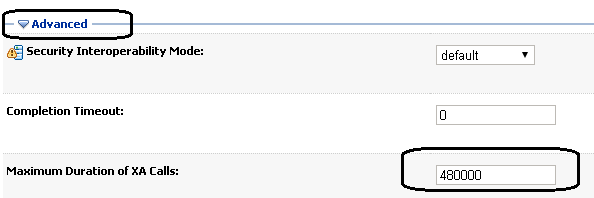
The problem was solved, at least for now.
Dieison.
 

OGG-0352: Invalid character for character set UTF-8 was found while performing character validation of source column

Almost a month without post!
My bad, december is always a crazy time to DBAs, right?

This post’s title error happens because the charset is different between databases used on replication thought GoldenGate and occurs only with alphanumerical columns (CHAR, VARCHAR, VARCHAR2), because, even the char length be the same, the data length will be different (like I explained here). Take a look in this example:

sourcedb> select table_name,column_name,data_length,char_length from dba_tab_cols where column_name=’NAME' order by 1,2,3;
 
TABLE_NAME    COLUMN_NAME     DATA_LENGTH CHAR_LENGTH
------------- --------------- ----------- -----------
TABLE_EXAMPLE NAME            25          25
destdb> select table_name,column_name,data_length,char_length from dba_tab_cols where column_name=’NAME' order by 1,2,3;

TABLE_NAME  COLUMN_NAME     DATA_LENGTH CHAR_LENGTH
------------- --------------- ----------- -----------
TABLE_EXAMPLE NAME            100         25


There is basically two solutions:
1) Change one of those charsets.
2) Add “SOURCECHARSET PASSTHRU” clause on the replicat file.

I usually prefer the second option, just because it’s less intrusive than number 1.


See ya!
Matheus.

WLST easeSyntax

Who works with WLST know it’s pretty boring to natigate to MBeans, because whenever necessary to put in parentheses () commands and quotation marks ‘ ‘. When we forget, need to retype the whole command again.
I found a command that helps a lot when it comes to navigate in MBean tree, it eliminates the need for parentheses and quotation marks.
After entering the WLST, type:

wls:/xpto_domain/serverConfig> easeSyntax()

wls:/xpto_domain/serverConfig> ls
dr– AdminConsole

dr– SelfTuning
dr– Servers
dr– ShutdownClasses
dr– SingletonServices

wls:/xpto_domain/serverConfig> cd Servers
wls:/xpto_domain/serverConfig/Servers> ls
dr– AdminServer
dr– WLS1_MSWS1
dr– WLS1_MSWS2

wls:/xpto_domain/serverConfig/Servers> cd WLS1_MSWS1
wls:/xpto_domain/serverConfig/Servers/WLS1_MSWS1> cd Log
wls:/xpto_domain/serverConfig/Servers/WLS1_MSWS1/Log> cd ..
wls:/xpto_domain/serverConfig/Servers/WLS1_MSWS1> cd Machine
wls:/xpto_domain/serverConfig/Servers/WLS1_MSWS1/Machine> ls
dr– app1wsmachine1

Not tested within python scripts, only browsing the tree Mbean.

Jackson.

WebLogic AdminServer Startup stopped at “Initializing self-tuning thread pool”

After starting AdminServer, it remains with starting status and stopped writing in log file in:

Check the disk space used, to make sure that there are no partitions with 100% utilization, including /tmp.
After them, make sure the owner of the weblogic (oracle) has have write permission of “/tmp”

[root@app1xptoosb1 /]# ls -tlhr / |grep tmp
drwxr-xr-x 5 root root 4.0K Nov 15 09:11 tmp

If the owner of weblogic does not have write permission must be set, because the application server writes some temporary files in the directory:

[root@app1xptoosb1 /]# chmod 777 /tmp

[root@app1xptoosb1 /]# ls -tlhr / |grep tmp
drwxrwxrwx 10 root root 4.0K Nov 18 09:44 tmp

Jackson.