EXP Missing Tables on 11.2

Made an exp and some table is missing, right? The database is 11.2+? The tables missing have no rows in source dabase, right? Bingo!
This happen because Oracle implemented a space saving feature on 11.2 called Deffered Segment Creation.

This feature basically makes that the first segment of a table is only allocated when the first row is inserted. It was implemented because Oracle realized is not rare to find databases with lots of tables that haven’t ever had a row.

The situation occurs because the EXP client uses dab_segments as index to exporting, and, this feature makes that no segment be allocated. For Oracle, it’s not a problem, considering the use of Datapump (EXPDP/IMPDP).

But (there always exist a “but”), let’s suppose you have to export the file to a different location not accessible by directory nor has local space, or either, your table has a long column (yes, it’s deprecated, I know… but let’s suppose this is a legacy system…). Then, you can do:

1) For all tables that has no rows, allocate an extent:
alter table owner.tabela allocate extent;

To generate, the script:

select 'alter table '||owner||'.'||table_name||' allocate extent;' from all_tables where num_rows=0;

2) Export using clausule VERSION=11.1 or lower on EXP. 🙂

More about Deffered Segment Creation: https://oracle-base.com/articles/11g/segment-creation-on-demand-11gr2

Hope It helped.
See ya!
Matheus.

ORA-04091: Table is Mutating, Trigger/Function may not see it

No!
This is not a super-table nor a x-table (X-Men joke, this was awfull, I know… I’m sorry).

ORA-04091: Table "TABLE NAME" is Mutating, Trigger/Function may not see it
ORA-06512: em "TRC_INSERT_TABLE", line 14
ORA-04088: error during execution of trigger 'TRC_INSERT_TABLE'

Very interesting. But not hard to understand. The cause is that the trigger (or a user defined plsql function that is referenced in this statement) attempted to look at (or modify) a table that was in the middle of being modified by the statement which fired it.

In other words, your trying to read a data the you are modifying. The obviously cause an inconsistency, the reason to this error. The data is “mutant”. But the error could be less annoying, right? Oracle and his jokes…

The solution is to rewrite the trigger to not use the table, or, in some situation, you can use an autonomous transaction, to turn it independent. It can be done using the clause PRAGMA AUTONOMOUS_TRANSACTION.

This FAQ can be useful to you: http://www.orafaq.com/wiki/Autonomous_transaction

Matheus.

ORA-00600: internal error code, arguments: [ktecgetsh-inc], [2]

Alert showing:

Errors in file /oracle/diag/rdbms/mydb/mydb/trace/mydb_smon_6024.trc (incident=9666):
ORA-00600: internal error code, arguments: [ktecgetsh-inc], [2], [], [], [], [], [], [], [], [], [], []

This is a non-fatal internal error happenned while SMON is doing a temporary segment drop. My SMON encountered 9 out of maximum 100 non-fatal internal errors.

So,

alter system set event="10061 trace name context forever, level 10" scope=spfile;

Restart Database and:

alter system reset event scope=both sid='*';

See ya!
Matheus.

Purge SYSAUX Tablespace

Your SYSAUX is bigger than the rest of database?
It’s not uncommon to “old” databases, usually bad administrated. Some databases configuration must cause this situation.

The general indication is to review stats and reports retention of objects and database.

But if you need to clean it now, how to do?
1) PURGE_STATS. It’s recommended to execute in smaller steps. Otherwise the RBS tablespace will be blown up.
2) Oracle is sometimes building new extents for SYSAUX stats table in other tablespaces. They will be moved back to the SYSAUX tablespace.
3) The Index rebuild will decrease the size of the indexes. They are mostly larger as the raw data.
4) The Indexes are partly function bases. Therefore it is imported in which order the index rebuild will be done. Otherwise you have to reexecute this steps again and again.

Going practical, I used the follow:

exec DBMS_STATS.PURGE_STATS(SYSDATE-180);
exec DBMS_STATS.PURGE_STATS(SYSDATE-160);
exec DBMS_STATS.PURGE_STATS(SYSDATE-140);
exec DBMS_STATS.PURGE_STATS(SYSDATE-120);
exec DBMS_STATS.PURGE_STATS(SYSDATE-100);
exec DBMS_STATS.PURGE_STATS(SYSDATE-80);
exec DBMS_STATS.PURGE_STATS(SYSDATE-60);
exec DBMS_STATS.PURGE_STATS(SYSDATE-40);
exec DBMS_STATS.PURGE_STATS(SYSDATE-20);
exec DBMS_STATS.PURGE_STATS(SYSDATE-7);
alter table WRI$_OPTSTAT_TAB_HISTORY move tablespace sysaux;
alter table WRI$_OPTSTAT_IND_HISTORY move tablespace sysaux;
alter table WRI$_OPTSTAT_HISTHEAD_HISTORY move tablespace sysaux;
alter table WRI$_OPTSTAT_HISTGRM_HISTORY move tablespace sysaux;
alter table WRI$_OPTSTAT_AUX_HISTORY move tablespace sysaux;
alter table WRI$_OPTSTAT_OPR move tablespace sysaux;
alter table WRH$_OPTIMIZER_ENV move tablespace sysaux;
Alter index SYS.I_WRI$_OPTSTAT_IND_ST rebuild TABLESPACE SYSAUX;
Alter index SYS.I_WRI$_OPTSTAT_IND_OBJ#_ST rebuild TABLESPACE SYSAUX;
Alter index SYS.I_WRI$_OPTSTAT_HH_ST rebuild TABLESPACE SYSAUX;
Alter index SYS.I_WRI$_OPTSTAT_HH_OBJ_ICOL_ST rebuild TABLESPACE SYSAUX;
Alter index SYS.I_WRI$_OPTSTAT_TAB_ST rebuild TABLESPACE SYSAUX;
Alter index SYS.I_WRI$_OPTSTAT_TAB_OBJ#_ST rebuild TABLESPACE SYSAUX;
Alter index SYS.I_WRI$_OPTSTAT_OPR_STIME rebuild TABLESPACE SYSAUX;

Matheus.

1 Year!

With some late, I’d like to remember that last 29 we commemorate 1 year from the first post! 😀

In this year some changes happened. We oscillated by times with more and times with less posts basically by my own obligation with other activities. Then, we had a big change: In November, the MatheusDBA Blog turned to GrepOra.com and some new authors arrived… It just shows how we grow up and how we quickly become much better in just a few months!

I’d like to thank and congratulate Cassiano, Dieison, Maiquel, Jackson, Will and most recently (not even have profile) Fabrício to join me in this blog and make it bigger than us!

oracle+cake
In this year was 76 posts, over 4.000 views from 100 different countries and over 400 references/shares in another sites!

We’d like to thank specially Brasil, EUA, India, UK, Russia, Canada, France, Germany, Australia and Holland, the top-ten readers. 🙂

Thanks you for reading this and feel free to contribute and follow us for 2016 and ahead!

Have a nice day and a great 2016 to we all!
Let’s elevate these statistics even more! 😀 😀

CREATE MVIEW: ORA-12014: table does not contain a primary key constraint

Ok, you are trying to create a materialized view involving a database link and found a ORA-12014, right?

CREATE MATERIALIZED VIEW &OWNER..MVW_NAME
REFRESH FORCE ON DEMAND
AS SELECT COL1, COL2, COL3 FROM TABLE@REMOTE_DB;
 *
ERROR at line 1:
ORA-12014: table 'TABLE' does not contain a primary key constraint
SQL>

It blowed me sometime ago. But it’s not complicated to workaround it, just try to:

CREATE MATERIALIZED VIEW &OWNER..MVW_NAME
REFRESH FORCE ON DEMAND AS
select * from (SELECT COL1, COL2, COL3 FROM TABLE@REMOTE_DB);

An alternative is to use MV log + WITH ROWID on REMOTE_DB side:

CREATE MATERIALIZED VIEW LOG MVW_LOG_NAME
ON TABLE WITH ROWID;

And

CREATE MATERIALIZED VIEW &OWNER..MVW_NAME
REFRESH FORCE ON DEMAND WITH ROWID
AS SELECT COL1, COL2, COL3 FROM MVW_LOG_NAME@REMOTE_DB;

PS: Make sure username used in remote_db database link has select privileges on MV log. On source db issue:

SELECT LOG_TABLE FROM DBA_MVIEW_LOGS WHERE LOG_OWNER='OWNER' AND MASTER = 'TABLE';

This will give you MV log table name. On target side issue:

SELECT * FROM MVW_LOG_NAME@remote_db;

See ya!
Matheus.

Shellscript: Using eval and SQLPlus

I always liked bash programming, and sometimes need to set Bash variables using information from Oracle tables.

To achieve that I’m using below solution, which I explain in details later.

# SQLPlus should return a string with all Bash commands
$ORACLE_HOME/bin/sqlplus -S -L -R 3 / as sysdba > /tmp/sqlplus.log <<-EOF
   SET PAGES 0 FEEDBACK OFF TIMING OFF VERIFY OFF LINES 1000
   SELECT 'OK:DBNAME='||UPPER(D.NAME)||'; INST_NAME='||I.INSTANCE_NAME AS STR
     FROM V\$DATABASE D, V\$INSTANCE I;
EOF

# Now, tests if sqlplus exit fine, and check if result string starts with OK keyword
if [ $? -eq 0 ] && [ "$( cat /tmp/sqlplus.log | head -n 1 | cut -d: -f1 )" == "OK" ]; then
   sed -i 's/OK://g' /tmp/sqlplus.log
   while read r; do eval "$r"; done </tmp/sqlplus.log
else
   echo "Failed to search local instance $ORACLE_SID"
   return 2
fi

In the first part, I call sqlplus, which select should return an string that contains valid bash commands, to set all variables I need. In this example, sqlplus returns Database Name and Instance Name:

      OK:DBNAME=xpto; INST_NAME=xpto_1;

The second part, exists only for consistency checks. It verify if result string starts with “OK” keywork. If all went fine, it execute the result string using the bash command eval.


eval – That is where magic happens!

The command eval, can be used to evaluate (and execute) an ordinary string, using the current bash context and environment. That is different than when you put your commands in a subshell.

The below source code, reads sqlplus.log and execute every command using eval:

while read line; do eval "$line"; done </tmp/sqlplus.log

Cassiano.

<EJB Exception in method: ejbPostCreate: java.sql.SQLException: XA error: XAResource.XAER_RMFAIL start() failed on resource 'ggds-datasource_domain': XAER_RMFAIL : Resource manager is unavailable

Some incidents that we face are expected. Usually we wait for problems when something changes in an environment.
But, some times, for no apparent reason, with no systemic alteration, we encounter errors where our first reaction is: what a f ***!?

This time we find a java exception in a standard domain for GoldenGate Director;

For months the application behaved stable and functional, until it did fails for no apparent reason;

When I saw part of the exception, “XAER_RMFAIL: Resource manager is unavailable” went straight to talk to one of the best DBAs know that Matheus Boesing, to request a check on the resource manager database, (No problem found).

… then we fall back into a BUG: 11672297 Bug: ORA-01092 MAPPED TO XAER_RMERR instead of XAER_RMFAIL – (Doc ID 1329800.1)

In version 12.1, this bug is fixed, but as a palliative solution can do the following:

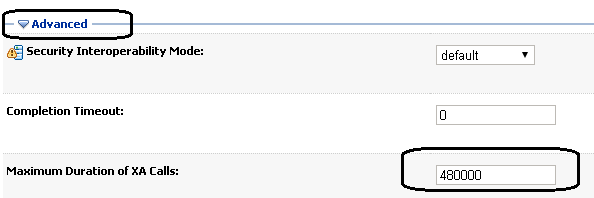
Increase the value (Maximum Duration of XA Calls) in JTA configurations of weblogic domain, the default value is 12000, in my case, I adjusted to 48000;

The problem was solved, at least for now.
Dieison.
 

OGG-0352: Invalid character for character set UTF-8 was found while performing character validation of source column

Almost a month without post!
My bad, december is always a crazy time to DBAs, right?

This post’s title error happens because the charset is different between databases used on replication thought GoldenGate and occurs only with alphanumerical columns (CHAR, VARCHAR, VARCHAR2), because, even the char length be the same, the data length will be different (like I explained here). Take a look in this example:

sourcedb> select table_name,column_name,data_length,char_length from dba_tab_cols where column_name=’NAME' order by 1,2,3;
 
TABLE_NAME    COLUMN_NAME     DATA_LENGTH CHAR_LENGTH
------------- --------------- ----------- -----------
TABLE_EXAMPLE NAME            25          25
destdb> select table_name,column_name,data_length,char_length from dba_tab_cols where column_name=’NAME' order by 1,2,3;

TABLE_NAME  COLUMN_NAME     DATA_LENGTH CHAR_LENGTH
------------- --------------- ----------- -----------
TABLE_EXAMPLE NAME            100         25


There is basically two solutions:
1) Change one of those charsets.
2) Add “SOURCECHARSET PASSTHRU” clause on the replicat file.

I usually prefer the second option, just because it’s less intrusive than number 1.


See ya!
Matheus.

Say Hello to Oracle Apex and for the new Blog member too!

Hi people!

That’s my first post and I would like introduce me and this great tool what I will talk about here, at this site, but Let’s start about Oracle Application Express, or Apex, which is probably your most intention here! You can read about my history with Apex in the end of this article.

Oracle Apex is a development tool that enables you to build applications using only your web browser, using basically PL-SQL, this familiarity helps to create departmental applications. Even DBA’s can create good web applications easily. Apex is not a new tool, was first released on 2006, and previously it was called HTML DB. After 10 years of development, offers a modern IDE, and with more dedication, you can use to build complex solutions using CSS and JavaScript.

Apex also comes with a entire system to manage your development life cycle. Using the Team Development it is possible to track your project progress from brainstorm to tracking bugs and continuous maintenances.

You can start using and testing Oracle Apex right now, just accessing apex.oracle.com and creating your own workspace. Just click Get Started and select Free Workspace. Remember that should be used for educational propose.

get_workspace

By the way, in the next weeks and some articles from now, I intend to write about how to create an entire application, describing most of standards options and explaining Oracle Apex in details.

I start using Apex in version 2, when the standard templates produces applications that looked like Enterprise Manager some years ago. The latest version 5.02 was released in October 2015. The Apex 5 has a revolutionary IDE, which is in the same way powerful, intuitive, clean and easy to use.

Enjoy and welcome to Apex World! There is an active community on OTN that supports mostly users needs and questions through discussion web forums.

Cassiano.